
Team roles and permissions
Team and Firm organisations use three roles to control billing, member management and learning access: Owner, Admin and Member.
Admin role
Admins can manage members, Group CPD Sessions and Team CPD activity without access to billing or ownership settings.
In this article: Compare roles · Assign or change an Admin · Choose a role · FAQs
Compare roles
Swipe horizontally to compare roles.
| Permission | Owner | Admin | Member |
|---|---|---|---|
| Number available | 1 | Multiple | Multiple |
| Manage billing and seats | |||
| Transfer ownership | |||
| Change roles | |||
| Invite and deactivate members | |||
| Run Group CPD Sessions | |||
| View Team CPD reports | |||
| Use learning content and My CPD |
Assign, remove or change a Team Admin
An Admin is often a practice manager, office manager, training coordinator, tax lead or learning champion. Admins can review Monthly Tax Update replay watches through Team CPD reporting, as well as invite and deactivate members, run Group CPD Sessions, and view or export Team CPD reports.
Owner permission required
Only the organisation Owner can change roles.
- Sign in to Tax Nuggets Academy as the organisation Owner.
- Select the circle containing your initial, then select Members.
- Find the member and select the three-dot menu.
- Select Change role.
- Choose Admin or Member, then select Update role.
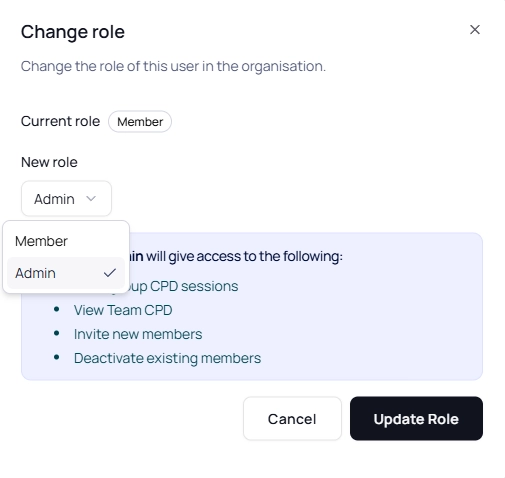
Choose the member’s new role, then select Update Role.
The Owner and member receive an email confirming the role change.
Choose a role
- Owner: the person responsible for billing and organisation-level decisions.
- Admin: a manager or training coordinator who manages members, runs Group CPD Sessions and views Team CPD reports.
- Member: a learner who uses the platform and views their own CPD report.
Frequently asked questions
Why can an organisation have only one Owner?
A single Owner provides clear accountability for billing and organisation-level decisions.
When should I use the Admin role?
Use Admin for someone who needs to manage members, run Group CPD Sessions and view Team CPD reports without access to billing.
Can Admins assign other Admins?
No. Only the Owner can assign or change roles.
Can I have multiple Admins?
Yes. You can assign multiple Admins.
What if the Owner is unavailable?
An Admin can contact support. We will complete security checks before making an account-level change, and ownership changes may still require the Owner’s confirmation.